

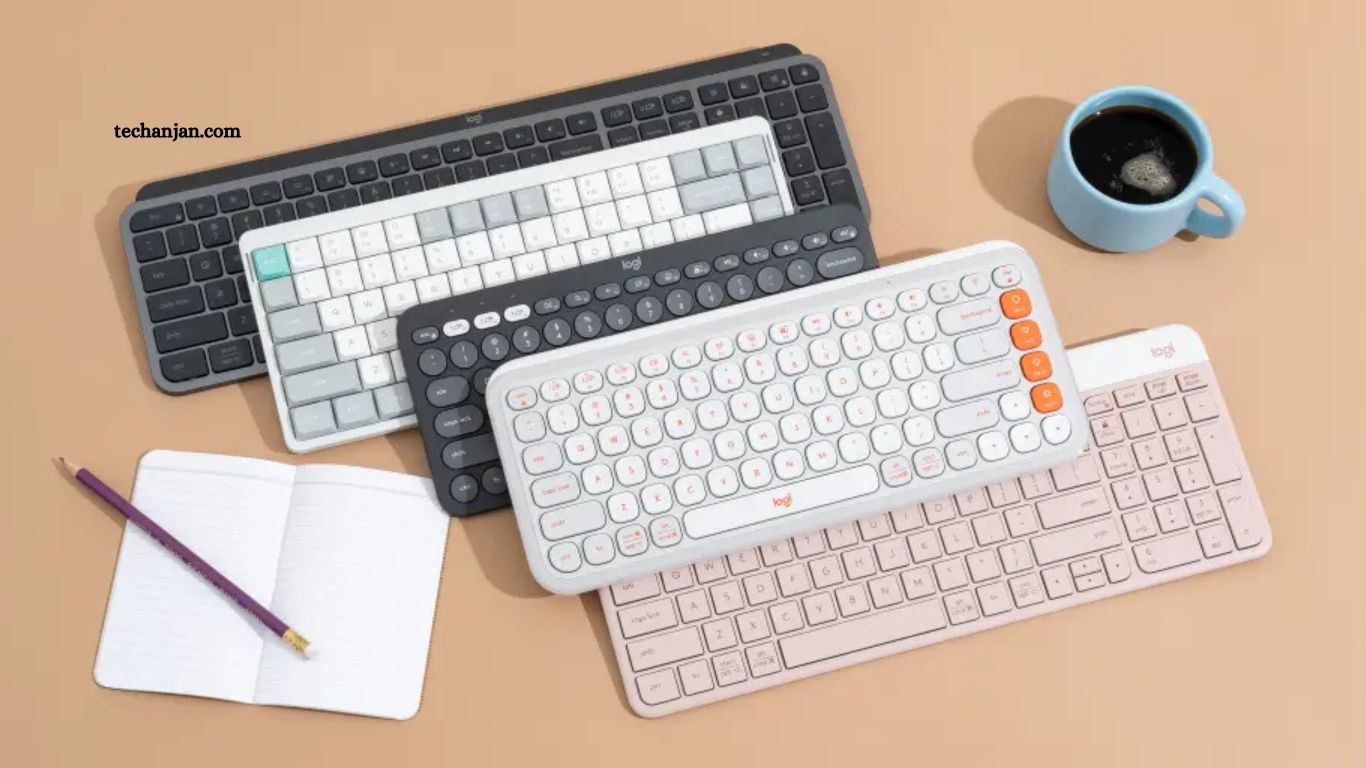
Wireless keyboards have become a practical choice for many people, whether they work from home, travel often, or simply want a cleaner desk setup. Bluetooth and wireless keyboards remove cable clutter, offer flexible device connections, and often include features designed for comfort and efficiency.
With so many options available, choosing the right keyboard can feel overwhelming. This guide explores the best Bluetooth and wireless keyboards, what makes them stand out, and how to choose the one that fits your needs.
Read More: Before You Buy This $20K Home Robot, Here’s What You Need to Know
Why Choose a Bluetooth or Wireless Keyboard?
Wireless keyboards offer convenience that wired models cannot always match. They allow you to work from a distance, switch between devices easily, and maintain a tidy workspace.
Key Benefits
- Freedom of movement without cable restrictions
- Multi-device support, especially with Bluetooth models
- Portability for travel or hybrid work
- Compatibility with laptops, tablets, phones, and smart TVs
Bluetooth keyboards connect directly to devices without a USB receiver, while wireless keyboards that use a dongle often provide lower latency and a stable connection. Each type has its advantages depending on how and where you use your keyboard.
Bluetooth vs Wireless Keyboards: What’s the Difference?
Although the terms are often used together, Bluetooth and wireless keyboards are not exactly the same.
Bluetooth Keyboards
- Connect directly through Bluetooth
- No USB port required
- Can pair with multiple devices
- Ideal for tablets, phones, and laptops
Wireless (USB Dongle) Keyboards
- Use a small receiver plugged into a USB port
- Often have faster response times
- Usually connect to one device at a time
- Common for desktop computers
Some keyboards support both Bluetooth and wireless connections, giving you more flexibility.
Key Features to Look For
Before choosing a keyboard, it helps to understand which features matter most for your daily use.
Keyboard Layout and Size
- Full-size keyboards include a number pad and are suitable for office work
- Tenkeyless keyboards save space by removing the number pad
- Compact keyboards are easy to carry and ideal for travel
Battery Life
Battery life can range from a few weeks to several months. Rechargeable keyboards are convenient, while those using replaceable batteries may last longer between changes.
Typing Comfort
Low-profile keys, key spacing, and tactile feedback all affect typing comfort. Some users prefer scissor-switch keys, while others enjoy mechanical switches.
Device Compatibility
Check whether the keyboard supports Windows, macOS, iOS, Android, or ChromeOS. Many modern keyboards include shortcut keys for multiple systems.
The Best Bluetooth and Wireless Keyboards
Below are some of the most reliable and well-reviewed keyboards available today, suitable for different use cases.
Logitech MX Keys
The Logitech MX Keys is a popular choice for professionals who spend long hours typing.
Why It Stands Out
- Smart backlighting that adjusts to ambient light
- Comfortable, quiet keys with a solid feel
- Supports Bluetooth and USB receiver
- Can switch between up to three devices
This keyboard works well for office tasks, writing, and coding. Its build quality and typing experience make it a dependable option for daily use.
Apple Magic Keyboard
Designed for Apple users, the Magic Keyboard offers a simple and clean typing experience.
Key Highlights
- Slim and lightweight design
- Excellent battery life
- Seamless integration with macOS and iPadOS
- Stable Bluetooth connection
While it works best within the Apple ecosystem, it can also be used with Windows devices, though some function keys may differ.
Microsoft Bluetooth Keyboard
This keyboard is a solid option for users who want a straightforward design without extra features.
What Makes It a Good Choice
- Comfortable key spacing
- Reliable Bluetooth connection
- Long battery life
- Works with multiple operating systems
It’s suitable for everyday typing tasks and pairs well with laptops and tablets.
Keychron K Series
Keychron keyboards are well known among mechanical keyboard users who want wireless support.
Why Users Like It
- Mechanical switches with Bluetooth connectivity
- Compatible with macOS, Windows, and Linux
- Compact and full-size options available
- Strong build quality
These keyboards offer a balance between traditional mechanical typing and modern wireless convenience.
Logitech K780 Multi-Device Keyboard
The Logitech K780 is designed for people who use several devices throughout the day.
Notable Features
- Built-in stand for phones and tablets
- Easy switching between devices
- Full-size layout with number pad
- Long battery life
It’s ideal for users who type on both computers and mobile devices.
Best Wireless Keyboards for Specific Needs
Different users have different priorities. Here are recommendations based on common use cases.
Best for Office Work
Logitech MX Keys – Comfortable, quiet, and reliable for long typing sessions.
Best for Travel
Apple Magic Keyboard or Logitech K380 – Lightweight and compact, easy to carry.
Best for Mechanical Keyboard Fans
Keychron K2 or K6 – Wireless mechanical keyboards with strong compatibility.
Best for Multi-Device Use
Logitech K780 – Smooth switching between computers, tablets, and phones.
How to Choose the Right Keyboard for You
Choosing the best Bluetooth or wireless keyboard depends on how you plan to use it.
Ask yourself:
- Do I type for long hours every day?
- Will I use it with more than one device?
- Do I prefer quiet keys or tactile feedback?
- Is portability important?
Answering these questions will narrow down your options and help you find a keyboard that feels natural to use.
Maintenance and Care Tips
A wireless keyboard can last for years with basic care.
- Clean keys regularly using a soft brush or cloth
- Avoid eating near the keyboard
- Keep it charged or replace batteries on time
- Store it safely when traveling
Proper care helps maintain key responsiveness and appearance.
Future Trends in Wireless Keyboards
Wireless keyboards continue to improve with better battery efficiency, improved Bluetooth stability, and enhanced compatibility. More manufacturers are focusing on eco-friendly materials and ergonomic designs to support long-term use.
Multi-device support and compact layouts are becoming more common as people work across different platforms.
Frequently Asked Questions
Can I use a Bluetooth keyboard with multiple devices?
Yes. Many Bluetooth keyboards allow you to switch between multiple paired devices, such as a laptop, tablet, and phone, using a simple key combination.
What type of keys are best for typing comfort?
Scissor-switch keys are quiet and comfortable for office work, while mechanical switches provide tactile feedback preferred by typists and gamers. Low-profile keys are ideal for portability and minimal desk strain.
Do wireless keyboards require a dongle?
Not all wireless keyboards require a dongle. Bluetooth keyboards connect directly to your device without one, while some wireless keyboards need a USB receiver for connectivity.
How do I maintain my wireless keyboard?
Clean the keyboard regularly using a soft brush or cloth, avoid eating near it, and ensure the batteries are charged or replaced when needed. Proper care helps maintain responsiveness and prolongs its lifespan.
Are there compact wireless keyboards for travel?
Yes, compact and lightweight keyboards like the Logitech K380 or Apple Magic Keyboard are designed for portability, making them ideal for travel or working on the go.
Can I use a wireless keyboard for gaming?
Many wireless keyboards are suitable for casual gaming. For competitive gaming, consider models with low latency and mechanical switches for better responsiveness.
Conclusion
Choosing the right Bluetooth or wireless keyboard can transform your daily typing experience. From compact travel-friendly models to full-size keyboards designed for long hours of work, there’s a keyboard for every need. Consider factors like typing comfort, battery life, device compatibility, and layout before making a decision.
