

Cloud computing has changed how people use technology for work, education, entertainment, and everyday tasks. Instead of depending only on a personal computer or physical server, users can access computing resources through the internet. This approach makes technology more flexible, scalable, and accessible for individuals and businesses.
Understanding cloud computing can seem difficult for beginners because it involves technical terms such as servers, storage, databases, virtualization, and cloud platforms. A simple explanation makes the concept much easier to understand. This guide explains what cloud computing means, how it works, its major types, benefits, common examples, and important considerations for new users.
Read More: Top Cybersecurity Tips to Protect Your Data
What Is Cloud Computing?
Cloud computing is the delivery of computing services through the internet. These services can include storage, processing power, databases, networking, software, analytics, and security tools.
Instead of purchasing expensive hardware and managing everything locally, users can access resources from cloud providers whenever needed. Resources can usually be increased or reduced according to demand.
For example, when you save files using an online storage service, your files are stored on remote servers rather than only on your computer. You can access those files from different devices as long as you have an internet connection.
How Does Cloud Computing Work?
Cloud computing works through a network of remote data centers containing powerful servers. Cloud providers operate these data centers and make computing resources available to customers through the internet.
When a user requests a cloud service, the provider allocates the required resources. Virtualization technology allows physical servers to run multiple virtual environments, helping providers use hardware efficiently.
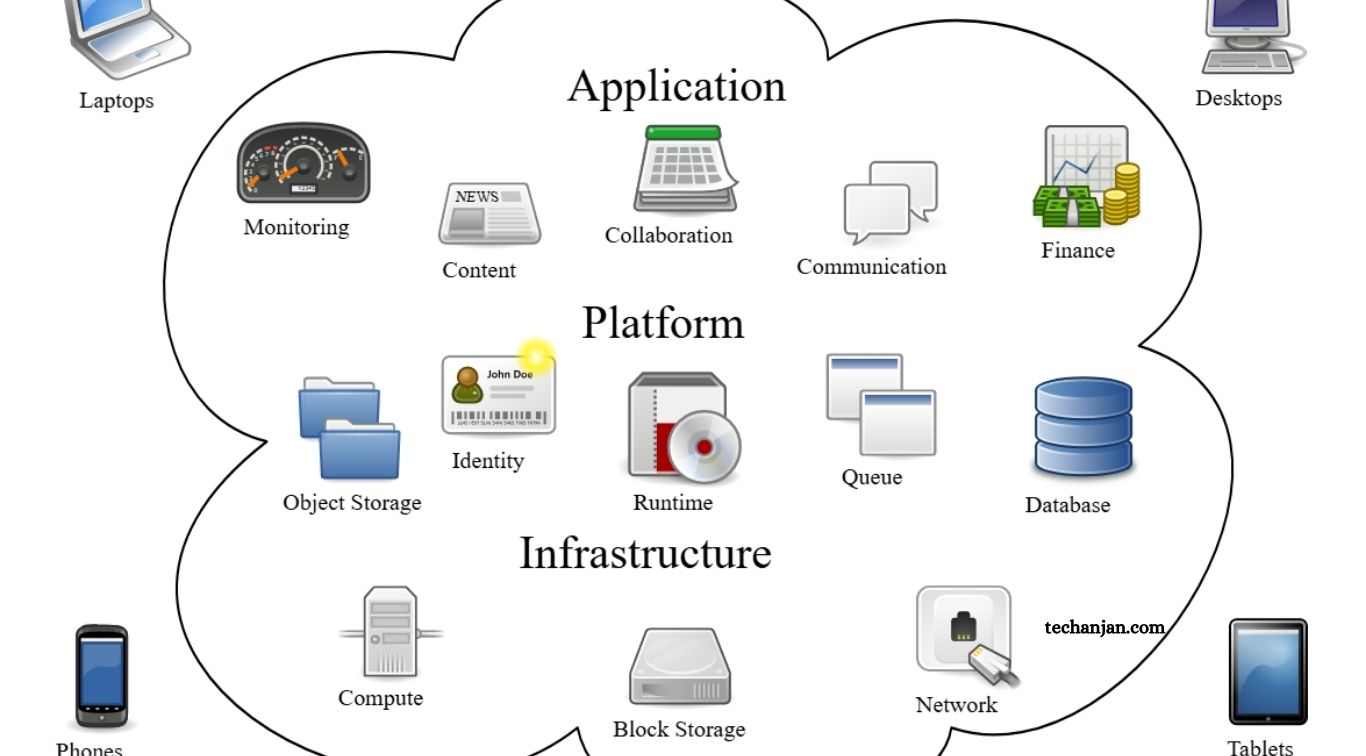
A typical cloud environment includes servers, storage systems, networking equipment, databases, security systems, and software platforms. These components work together to deliver services without requiring users to manage the underlying physical infrastructure.
Why Is Cloud Computing Important?
Cloud computing provides businesses and individuals with access to technology without requiring large investments in physical infrastructure.
A small business, for example, can use cloud-based applications, storage, databases, and backup systems without building its own data center. A growing company can also increase its computing resources when traffic rises.
Cloud computing has become important because it supports remote work, online applications, artificial intelligence, data analysis, streaming services, mobile applications, and modern websites.
Main Types of Cloud Computing
Cloud computing can be divided into different deployment models. Each model offers a different approach to managing infrastructure and resources.
Public Cloud
A public cloud provides computing resources through a third-party provider. Multiple customers use the provider’s infrastructure while their data and environments remain logically separated.
Public cloud services are popular because they reduce hardware costs and allow users to scale resources quickly.
Private Cloud
A private cloud is designed for a single organization. The infrastructure can be hosted within the company’s own facilities or managed by an external provider.
Private clouds can provide greater control over infrastructure, configurations, and security. They are often considered by organizations with specific regulatory or operational requirements.
Hybrid Cloud
A hybrid cloud combines public and private cloud environments. Organizations can keep certain workloads in a private environment while using public cloud resources for other applications. This approach offers flexibility and can help businesses balance control, performance, cost, and scalability.
Cloud Computing Service Models
Cloud services are commonly divided into three major categories.
Infrastructure as a Service
Infrastructure as a Service, commonly called IaaS, provides fundamental computing resources such as virtual machines, storage, and networking.
Users have more control over the operating system and applications while the cloud provider manages the physical infrastructure.
Platform as a Service
Platform as a Service, or PaaS, provides an environment for developing and deploying applications. Developers can focus on writing and managing application code without handling much of the underlying infrastructure. PaaS can make application development faster and more convenient.
Software as a Service
Software as a Service, known as SaaS, delivers complete applications through the internet. Users generally access these applications through a web browser or dedicated app.
Email platforms, online office applications, project management tools, and customer relationship management software are common examples of SaaS.
Common Examples of Cloud Computing
Many services people use every day depend on cloud computing. Online file storage allows users to upload documents, photos, and videos to remote servers. Streaming platforms deliver movies and music without requiring users to store large media libraries locally.
Businesses also use cloud-based email, accounting software, collaboration platforms, customer databases, website hosting, analytics tools, and backup systems.
Mobile applications frequently depend on cloud servers to synchronize information between devices. Online gaming services can also use cloud infrastructure to process data and deliver content to players.
Benefits of Cloud Computing
Cloud computing offers several important advantages.
Lower Infrastructure Costs
Organizations do not always need to purchase and maintain large amounts of physical hardware. Cloud services allow companies to pay for resources based on their requirements.
Easy Scalability
Cloud resources can often be increased when demand grows and reduced when demand falls. This flexibility is useful for websites, applications, and businesses experiencing changing workloads.
Remote Accessibility
Cloud services can be accessed from different locations and devices. This feature supports remote work, online learning, collaboration, and distributed teams.
Faster Deployment
Cloud platforms provide ready-to-use infrastructure and software tools. Developers can create and deploy applications without waiting for physical servers to be installed.
Data Backup and Recovery
Cloud storage and backup services can help protect important information from hardware failures, accidental deletion, and other problems. Effective backup strategies still require proper configuration and regular testing.
Automatic Updates
Many cloud-based applications receive updates from the provider. Users can benefit from new features, performance improvements, and security fixes without manually maintaining the underlying infrastructure.
Is Cloud Computing Safe?
Cloud computing can provide strong security, but safety depends on how services are designed, configured, and managed.
Major cloud providers typically use security technologies such as encryption, access controls, monitoring, authentication, and network protection. However, users still have responsibilities.
Weak passwords, excessive permissions, exposed storage, poor configurations, and stolen credentials can create security risks. Organizations should use strong authentication, limit user permissions, monitor activity, and protect sensitive information. Cloud security is therefore a shared responsibility between the provider and the customer.
Cloud Computing vs Traditional Computing
Traditional computing often requires organizations to purchase and maintain physical servers, storage devices, networking equipment, and other infrastructure.
Cloud computing moves much of this infrastructure management to a cloud provider. Instead of owning every physical component, users access resources through the internet.
Traditional infrastructure can provide direct control over hardware, while cloud computing generally provides greater flexibility and faster scalability. The right approach depends on an organization’s budget, workload, security requirements, and technical needs.
Challenges of Cloud Computing
Cloud computing also has limitations. Internet connectivity can affect access to cloud services. Service interruptions may temporarily prevent users from accessing applications or data. Costs can also become difficult to control when resources are poorly managed.
Data privacy and compliance require careful attention, especially for organizations handling sensitive information. Moving applications from local infrastructure to the cloud can also require planning, technical expertise, and time.
Vendor lock-in is another consideration. Applications built around one provider’s services may require significant effort to move to another platform.
How Beginners Can Start Learning Cloud Computing
Beginners should first understand basic concepts such as servers, storage, networking, databases, operating systems, and virtualization.
After learning these fundamentals, exploring IaaS, PaaS, and SaaS can provide a clearer picture of how cloud services operate. Hands-on practice is particularly useful because cloud platforms allow learners to experiment with virtual machines, storage, databases, and application deployment.
Learning basic cybersecurity and cost management is also valuable. Cloud computing involves more than simply storing files online; it represents a complete approach to delivering and managing technology resources.
Future of Cloud Computing
Cloud computing continues to play an important role in modern technology. Artificial intelligence, machine learning, big data, edge computing, and advanced application development increasingly rely on cloud infrastructure.
Businesses are also adopting cloud environments to improve flexibility and support digital transformation. As cloud technologies evolve, services are expected to become more automated, intelligent, and efficient.
Frequently Asked Questions
What is cloud computing?
Cloud computing delivers computing services such as storage, servers, databases, and software through the internet.
How does cloud computing work?
Cloud providers operate remote data centers that deliver computing resources to users through internet-based platforms.
What are the main types of cloud computing?
The main types are public cloud, private cloud, and hybrid cloud.
What are the three cloud service models?
The three major models are IaaS, PaaS, and SaaS.
Is cloud computing secure?
Cloud computing can be secure when providers and users follow strong security practices, access controls, and data protection measures.
What are the benefits of cloud computing?
Key benefits include scalability, lower infrastructure costs, remote access, faster deployment, flexibility, and easier data backup.
Conclusion
Cloud computing provides computing resources through the internet instead of requiring users to depend entirely on local hardware. Its major areas include storage, servers, databases, networking, software, analytics, and security. For beginners, understanding the basic cloud models and service types creates a strong foundation for learning more advanced technology.

1 Comment
Pingback: Best Productivity Apps for Everyday Use - TechAnjan